USB Modem Power Issues / USB Extensions

Hi Guys, I had exactly the same issue with the modem overheating and then . I tested my heat theory by working directly next to the aircon vent. Modem lasted a full hour before disconnecting. (I was frozen in 20 minutes!). At room temp it lasts about 10-15min before the problem starts. I also noticed that there arent any heating vents on the black modem. (E180 I think.) Anyway, I couldnt take it so I returned it to Game this afternoon. Got a full refund since it is less than 7 days.

My solution...I am going to purchase this "https://www.nivo.co.za/#buy~victory.301.3g.usb.modem~p22875" and the 5GB sim seperately. I believe it will work but perhaps one of you gurus can check it out for me. The way I figure is that you pay R1000 for a modem. (R3000 modem&bundle - R2000 sim only.). So Im actually saving bout R374. And Im purchasing a decent modem.

I know that its only 7.2mps and not 21. But I have never seen over 7.2 on speedtest.net anyway.

I've already paid for the new modem. Should be here by the end of the week. Will cancel the deal if there is is a better solution though. Any thoughts?

Unless I am mistaken - looking at the specs for the modem you have ordered, it will only be able to do EDGE speeds on 900 Mhz. It will be as slow as the old dial-up.

Cell C require a modem with HSPA+ at 900 Mhz, because that is the freq band that their high speed network operates on
 
Hi Guys, I had exactly the same issue with the modem overheating and then . I tested my heat theory by working directly next to the aircon vent. Modem lasted a full hour before disconnecting. (I was frozen in 20 minutes!). At room temp it lasts about 10-15min before the problem starts. I also noticed that there arent any heating vents on the black modem. (E180 I think.) Anyway, I couldnt take it so I returned it to Game this afternoon. Got a full refund since it is less than 7 days.

My solution...I am going to purchase this "https://www.nivo.co.za/#buy~victory.301.3g.usb.modem~p22875" and the 5GB sim seperately. I believe it will work but perhaps one of you gurus can check it out for me. The way I figure is that you pay R1000 for a modem. (R3000 modem&bundle - R2000 sim only.). So Im actually saving bout R374. And Im purchasing a decent modem.

I know that its only 7.2mps and not 21. But I have never seen over 7.2 on speedtest.net anyway.

I've already paid for the new modem. Should be here by the end of the week. Will cancel the deal if there is is a better solution though. Any thoughts?

I would recommend this modem instead. Works on 900 MHz at 21.6 Mbps. I have one and am very satisfied with it.
 
Last edited:
RE:Will this work?

Thank you Geoff. Im cancelling my order right now. Hope its not too late. A quick ?: Did you purchase this modem from this exact same supplier. I have never dealt with digital gr8ness before and want to make sure they are reputable. Thanks.

@MadHawk - Thanks for putting that in a link. Didnt know how.

Regards,
Jonathan

PS: Am I right when I sy that 21mbps does not matter right no since over 7.2 has never been recorded by a 3G user on speedtezt within southafrica?
 
Last edited:
Am I right when I sy that 21mbps does not matter right no since over 7.2 has never been recorded by a 3G user on speedtezt within southafrica?

Take a look at the Speed test results thread. There's a few people who get speeds over 7.2 Mbps.

I personally get speeds over 7.2 Mbps. It depends on your location and environment/terrain.

1167031856.png
 
Take a look at the Speed test results thread. There's a few people who get speeds over 7.2 Mbps.

I personally get speeds over 7.2 Mbps. It depends on your location and environment/terrain.

1167031856.png

My personal best was just over 14Mbps in Waterkloof (PTA). I work literally across the road from a Cell C tower, so get decent speeds here. Not THAT lucky at home though
 
Thank you Geoff. Im cancelling my order right now. Hope its not too late. A quick ?: Did you purchase this modem from this exact same supplier. I have never dealt with digital gr8ness before and want to make sure they are reputable. Thanks.

@MadHawk - Thanks for putting that in a link. Didnt know how.

Regards,
Jonathan

PS: Am I right when I sy that 21mbps does not matter right no since over 7.2 has never been recorded by a 3G user on speedtezt within southafrica?

Yes, I bought it from that supplier. You can go to this website to get software and firmware updates. Also see this post.
 
Last edited:
thank you. busy trying to cancel the order of the first modem from Nivo. Nivo arent available through skype, tel, email and cell! Hope I didnt get shafted.
 
THANKS TO ALL

Guys,
Thanks for your advice. Using my new modem with CellC card and its working superbly. Really great system, should have just done this in the first place.
 
Last edited:
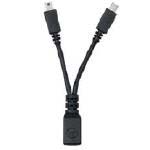
Overheating MF668 modem. USB Y extension cable?

Anyone knows where I can get one?

Apparently the USB modem like the CellC ZTE mf668 overheat and give bad performance in some cases due to the limited current available with some USB ports due to hardware limitations. This Y-cable alleviates this problem by supplying more current.
y_cable.jpg
 
Last edited:
You shouldn't experience issues with the modem not receiving enough power if it's directly plugged into the USB port. If you are planning on using an USB extension cable, an Active USB Cable should do the job. Works like a charm for me.
 
You shouldn't experience issues with the modem not receiving enough power if it's directly plugged into the USB port. If you are planning on using an USB extension cable, an Active USB Cable should do the job. Works like a charm for me.

Thanks, in Australia TELSTAR actually ship the ZTE MF668 modem with a Y cable to be used. A Y-cable are also used with some external USB drives to supply more current.

Yes it is a Y splitter cable (supplied with the modem). The modems spec is 450ma max current.

The USB spec for supplyable max current from any one port is 500ma but a lot of laptops have trouble supplying this. The Y splitter enables you to siphon some extra current from an unused USB port ensuring the MF668 to operate within its specs.

On one of my machines it does not need the Y cable, on my other machine I noticed it was ruining warmer and it ran less warmer when I used the Y cable.

On both my machines device manager reported that the current draw from the USB port that the MF668 was assigned to was 500ma.

Cheers MTU.

http://forums.whirlpool.net.au/archive/1560593
 
Last edited:
Take note that USB extension cables are "prohibited cable assemblies" in the USB 2.0 specfication.
http://www.usb.org/developers/docs/ecn1.pdf

6.4.4 Prohibited Cable Assemblies
USB is optimized for ease of use. The expectation is that if the device can be plugged in, it will work.
By specification, the only conditions that prevent a USB device from being successfully utilized are lack of power, lack of bandwidth, and excessive topology depth. These conditions are well understood by the system software.

Prohibited cable assemblies may work in some situations, but they cannot be guaranteed to work in all instances.
  • Extension cable assembly
    A cable assembly that provides a Series “A” plug with a series “A” receptacle or a Series “B” plug with a Series “B” receptacle or a Series “mini-B” plug with a Series “mini-B” receptacle. This allows multiple cable segments to be connected together, possibly exceeding the maximum permissible cable length.
  • Cable assembly that violates USB topology rules
    A cable assembly with both ends terminated in either Series “A” plugs or Series “B” (or “mini-B”) “B” receptacles. This allows two downstream ports to be directly connected.
    Note: This prohibition does not prevent using a USB device to provide a bridge between two USB buses.
  • Standard detachable cables for low-speed devices
    Low-speed devices are prohibited from using standard detachable cables. A standard detachable cable assembly must be high-/full-speed. Since a standard detachable cable assembly is high-/full-speed rated, using a long high-/full-speed cable exceeds the capacitive load of low-speed.

This doesn't apply to active or powered extensions, they are actually just USB hubs with a long cable.
 
Last edited:
A big hearty **** to diddly USB ports :mad:

E1820 is very finicky with power supplied from USB port - if it drops below a certain threshold, you can forget about getting connected :mad:
 
A big hearty **** to diddly USB ports :mad:

E1820 is very finicky with power supplied from USB port - if it drops below a certain threshold, you can forget about getting connected :mad:

I have been suspecting this also...it seems my time between disconnects is longer when my speedstick is connected directly to the motherboard, than my usb on the front of my case...mmm
 
I have been suspecting this also...it seems my time between disconnects is longer when my speedstick is connected directly to the motherboard, than my usb on the front of my case...mmm

I'm looking for an USB cable with two cables on the PC side which'll get juice from two USB slots instead of just the one.

The Huawei E220 (and some external DVD drives) do have this type of cable, but it is not the correct cable.
 
Top
Sign up to the MyBroadband newsletter
X