New Slim Line 120GB PS3 + Sony Home Entertainment System + Help

mbeylis

Senior Member
Joined
Jun 8, 2006
Messages
564
Reaction score
2
Location
Benoni
Hello,

Me again.

Okay so I bought the new Sony 120GB PS3 Slim Line over the weekend. Stood 2 hours in a queue waiting for the new BT Games in Eastgate to open and managed to get the second last one of the 10 they had on special :)

My question now is how do I set the PS3 to work in conjunction with my Sony HDDW5500 Home Entertainment System?

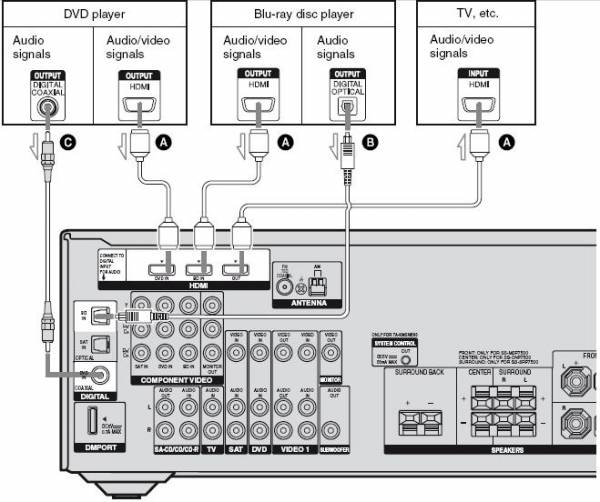
The new PS3 comes with a HDMI port out but there is no specific HDMI port in on the HES Receiver, there is only one for Blu-Ray in and DVD in. So seeing as the PS3 has a Blu-ray player I plugged it into the Blu-Ray In port

This partly works in the sense that i can see the picture on the screen but I get NO SOUND through the entertainment system at all :mad:

I have gone through all the settings on the PS3 at set both Video and Audio to HDMI and selection to Automatic. Still no sound

The only way that I have managed to get any sound at all is to change the audio settings on my LCD from Home Theatre System to TV but then I only get sound through the TV and not the Entertainment System

Is there something that I am missing?

Any help would be appreciated

Thanks
Mark
 
Check how you set up the audio channels on the Sony receiver? When you see the picture on the TV the correct video channel is selected, normally there is also a quick audio button on the receiver to change which audio port to use for the selected video channel. Remember you can change the audio port to to use as HDMI/Optical/etc.
 
Check how you set up the audio channels on the Sony receiver?

Hello

I would have thought the amp would determine which audio channel to use automatically depending on the type of signal input

Will have to play around with the Amp again I guess. Will have a look this afternoon

Not to sure about what you mean by "Check how you set up the audio Channels". When setting up the amp initially all I did was to plug in all the cables and then use the Sony AutoCalc feature to setup the sound automatically and voila it all worked

When you see the picture on the TV the correct video channel is selected, normally there is also a quick audio button on the receiver to change which audio port to use for the selected video channel. Remember you can change the audio port to to use as HDMI/Optical/etc.

I haven't seen any such quick audio button the receiver but will have a closer look this afternoon

Thanks
Mark
 
With the PS3, the video & sound is integrated into the HDMI port. You will need to check if that is the case with your reciever. If your reciever needs the video & audio source split, you will require an optical cable for the PS3 and specify that on the settings that audio will be output via optical and not HDMI.
 
Check your setting on your PS3 too it might be set to a different audio out not HDMI.
 
With the PS3, the video & sound is integrated into the HDMI port. You will need to check if that is the case with your receiver. If your receiver needs the video & audio source split, you will require an optical cable for the PS3 and specify that on the settings that audio will be output via optical and not HDMI.

Hope not. I mean the whole point of HDMI is so that you only need 1 cable for everything. Not sure how to check what the receiver wants but will try to investigate

Thnx
 
Hello

I would have thought the amp would determine which audio channel to use automatically depending on the type of signal input

Will have to play around with the Amp again I guess. Will have a look this afternoon

Not to sure about what you mean by "Check how you set up the audio Channels". When setting up the amp initially all I did was to plug in all the cables and then use the Sony AutoCalc feature to setup the sound automatically and voila it all worked


I haven't seen any such quick audio button the receiver but will have a closer look this afternoon

Thanks
Mark

The sound auto calc is for setting up the speakers distance placement. Nothing to do with the actual audio feed channel associated with the selected video channel. Yes The HDMI should automatically be associated with the correct HDMI input channel but as you said you plugged it in the BluRay input? I will have to look at the manual to see the correct configuration tho. All I am stating is that you can select the audio channels independantly on my system.
 
Last edited:
I have the same amp, you do not get surround 6.2 sound via the HDMI alone, you must use the optic out from your device (ie your PS3). I do this with my mVix player. I only use the HDMI for the video...

If you use the HDMI only it will only pass the audio signal out to your TV/LCD (if you have HDMI to said TV/LCD), and it will only be stereo. If you want better, buy a better amp...

PS... RTFM :D :p

Edit: Ok I have the DDW-5000 (not 5500) but the amp specs seem to be the same...
 
Last edited:
Hope not. I mean the whole point of HDMI is so that you only need 1 cable for everything. Not sure how to check what the receiver wants but will try to investigate

Thnx

That is correct. but this statement concerns me and it seems that the setup between the HES and LCD is not correct. The LCD have noting to do with the sound selection on the HES. So there is something amiss.

The only way that I have managed to get any sound at all is to change the audio settings on my LCD from Home Theatre System to TV but then I only get sound through the TV and not the Entertainment System

The way I see it is that there should be a HDMI out from PS3 to HES input (BluRay?) AND THEN a HDMI out from the HES output to LCD input. Then assuming the PS3 OUTPUT settings are correct then the HES must be set to the correct HDMI channel (BluRay?) which will route the Video/Audio data signals to the LCD HDMI input. The LCD should then be selected on the respective input channel used. If it's a Bravia or CEC compatible LCD all should be automatic. :confused:
 
The way I see it is that there should be a HDMI out from PS3 to HES input (BluRay?) AND THEN a HDMI out from the HES output to LCD input. Then assuming the PS3 OUTPUT settings are correct then the HES must be set to the correct HDMI channel (BluRay?) which will route the Video/Audio data signals to the LCD HDMI input. The LCD should then be selected on the respective input channel used. If it's a Bravia or CEC compatible LCD all should be automatic. :confused:

Hello

My setup is as you describe

HDMI cable from PS3 out to HES in (Blu-ray HDMI in) - check
HDMI cable from HES HDMI out to Sony Bravia LCD HDMI in - check
PS3 set to HDMI for both Video and Audio
HES input selection set to BD (Blu-ray Disc)

I get picture but no sound

Maybe it is as IRG says that I need an optical cable for audio :(
 
Hello

My setup is as you describe

HDMI cable from PS3 out to HES in (Blu-ray HDMI in) - check
HDMI cable from HES HDMI out to Sony Bravia LCD HDMI in - check
PS3 set to HDMI for both Video and Audio
HES input selection set to BD (Blu-ray Disc)

I get picture but no sound

Maybe it is as IRG says that I need an optical cable for audio :(

I would have thought that there would at least be stereo via the HDMI... I'm sure I read that it passes the audio through to the LCD. Just plug the optic in... that will work. PS I dont even know what my LCD speakers sound like :eek: always had them on mute :cool:


From page 22 of the manual:

The sound is output from the TV speaker
only when a playback component and this
receiver, as well as this receiver and the TV
are connected via an HDMI jack.
To output the sound from the supplied
speakers and to take advantage of the multi
channel surround sound, be sure to
– connect the digital audio jacks on the
playback component to the receiver.
– turn off the TV’s volume or activate the
TV’s muting function.

DDW5500.JPG
 
Last edited:
Well I have emailed Sony as well, seeing as these are all Sony products you would hope that they will be able to help :sick: Will wait and see there reply

I am still of the opinion that if you have HDMI then the video and audio should both work via it. Hopefully it is just some setting somewhere. Doesn't make sense that you need optic if you got HDMI
 
Well I have emailed Sony as well, seeing as these are all Sony products you would hope that they will be able to help :sick: Will wait and see there reply

I am still of the opinion that if you have HDMI then the video and audio should both work via it. Hopefully it is just some setting somewhere. Doesn't make sense that you need optic if you got HDMI

As i read it, and understand, you should get stereo only for:
Blu Ray HDMI out> Amp HDMI in > Amp HDMI out > LCD HDMI in

for surround you have to use the optic from Blu-Ray out > Amp optic in

The HDMI on the Sony amp does not decode the digital audio, it only passes it through to the LCD.

BTW, these questions have been answered to you already... http://forum.dstv.com/archive/index.php/t-3998.html
 
Last edited:
As i read it, and understand, you should get stereo only for:
Blu Ray HDMI out> Amp HDMI in > Amp HDMI out > LCD HDMI in

for surround you have to use the optic from Blu-Ray out > Amp optic in

The HDMI on the Sony amp does not decode the digital audio, it only passes it through to the LCD.

BTW, these questions have been answered to you already... http://forum.dstv.com/archive/index.php/t-3998.html

Sounds logical

So where can i purchase and optical audio cable from in the Boksburg area? Hi-FI Corp?

As for my post on the DSTV forum that was in connection with my DSTV decoder with which I get sound when connecting via HDMI but no picture, but that was due to other issues which I now understand, mainly no HD out port on DSTV no HD picture

thnx
 
Last edited:
Does not make sense...

I've got a Sony 5.1 setup with a similar, albeit less powerful, amp. I quite happily get 5.1 through HDMI from my 360. :confused:
 
Does not make sense...

I've got a Sony 5.1 setup with a similar, albeit less powerful, amp. I quite happily get 5.1 through HDMI from my 360. :confused:

Was there anything special that you needed to configure or did you just plug everything in via HDMI and it worked?

If you don't mind can you explain exactly how you have yours set up

Thanks
Mark
 
I read the amp's manual? :confused: :D

No, not specifically. My 360 also goes into 'Bluray' on the amp, which I've renamed. As far as I recall there is a setting on the amp to either pass through or intercept the audio... I'll need to go digging though.

360 to amp via HDMI, amp to TV via HDMI - the amp doesn't switch from one type of source to another. Composite in, composite out. HDMI in, HDMI out etc.
 
I read the amp's manual? :confused: :D

No, not specifically. My 360 also goes into 'Bluray' on the amp, which I've renamed. As far as I recall there is a setting on the amp to either pass through or intercept the audio... I'll need to go digging though.

360 to amp via HDMI, amp to TV via HDMI - the amp doesn't switch from one type of source to another. Composite in, composite out. HDMI in, HDMI out etc.

Trust me I have read my manual backwards, forwards and upside down :D

Beginning to think that the problem might be my amp and the way it handles the HDMI single as I recall reading that it only passes through the HDMI signal :(
 
Top
Sign up to the MyBroadband newsletter
X