Possible to Save download/application to CD/DVD/stick, via a Download Manager ?

I O U

Senior Member
Joined
Jan 31, 2011
Messages
843
Reaction score
3
Via FreeDownloadManager (FDM), I tried to Save a file to a CD, by right-clicking on file name, then by dragging it across to DVD RW Drive D:

However, there's no option to save it to CD, by electing to ''Send to...'' (as in Windows, in IE) .

Looked through headings in FDM - closest I found was ''Export'' option; seems to only want to save the file in a .txt format - does that imply it won't allow it (the contents of the file) to ''Run'' from the CD thereafter ??

Aim is to be able to save certain larger Windows Updates to FDM, and then simply ''Send to...'' CD, DVD+RW or memory stick.

Any way to do this, or can one only ''Run'' apps. [from a D/Load Manager] onto same PC the Manager's on ?
 
377484935_b4ee114483.jpg


This post seems to have 5 seperate queries each with very little information

Aim is to be able to save certain larger Windows Updates to FDM, and then simply ''Send to...'' CD, DVD+RW or memory stick.
http://www.autopatcher.com/
 
If you are trying to update lots of computers (+10) just deploy a Windows Server Update Services box on your network. It will be less headache in the long run. It does tend to use more bandwidth than would make it useful than for two or three computers though.

Also, don't try to download files directly to removable media, just download them to the PC's hard drive and copy them once done.

You can get Windows Update files directly via http://catalog.update.microsoft.com/, you will just need to look up the update numbers from the Windows Update client.

Just on the offchance this is all about the Window 7 service pack, here is the direct download link for that too:

http://www.microsoft.com/downloads/en/details.aspx?FamilyID=c3202ce6-4056-4059-8a1b-3a9b77cdfdda
 
Download Allway Sync .... http://allwaysync.com/

Set it up to synchronise your download folder with whatever external folder your want the files to be copied to.
You can set up multiple jobs at whatever time period you want.
 
If you are trying to update lots of computers (+10) just deploy a Windows Server Update Services box.. ...download files directly to PC's hard drive and copy them once done.
You can get Windows Update files directly via .., you will just need to look up the update numbers from the Windows Update client.

Download Allway Sync .... http://allwaysync.com/


@HeXd & @Garyvdh : thanks for the extremely useful info.
It's not for a network/lots of computers ; in fact, more for me to experiment & learn new stuff.
The Windows Update Catalog worked out brilliantly, and after a bit of a run-around, managed to save file in FDM & automatically copy it to a folder created for these files & then can copy it to D: .

Allway Sync wouldn't get past the homepage, when clicking on 'download' (site problem or something, as I tried 2 different connections.)
No problem for now, as I've managed to save the files as stated above.

Problem I now have is how to ''Run'' the files once they've been saved to either in C: or D: , for e.g. after any length of time ? (If they're d/loaded & Run from Windows Updates directly, then program does it automatically, so my question now is how would you Run them on 2nd computer @ later stage?)

Windows wants to know correct program to open the file, but I don't even know file extension of these Windows Updates. I tried ''Compression (zipped) folder'' option but got nowhere.

Thanks if able to help with the final step in the process ?
 
Yeah I liked him too :)

Appreciate your input, and will definitely try it out.

Have just been reading through ''What's Autopatcher'', but run out of time implementing it, for this afternoon.

Rgds.
 
Appreciate your input, and will definitely try it out.

Have just been reading through ''What's Autopatcher'', but run out of time implementing it, for this afternoon.

Rgds.

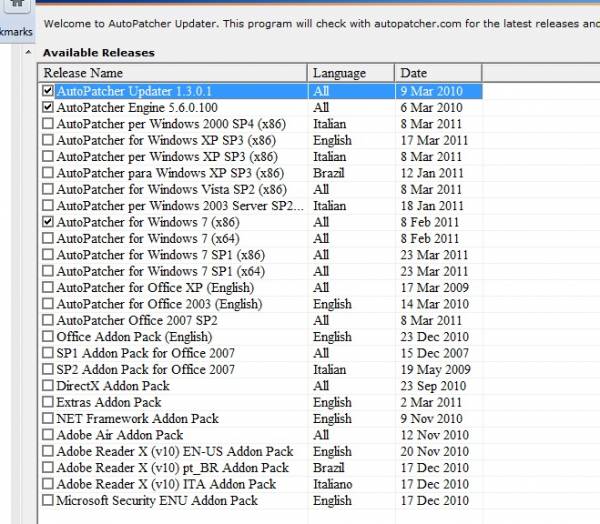
Basic app is a 5mb download,extract it to a folder,run the apup.exe application,select which patches you want it to download
screen11.jpg


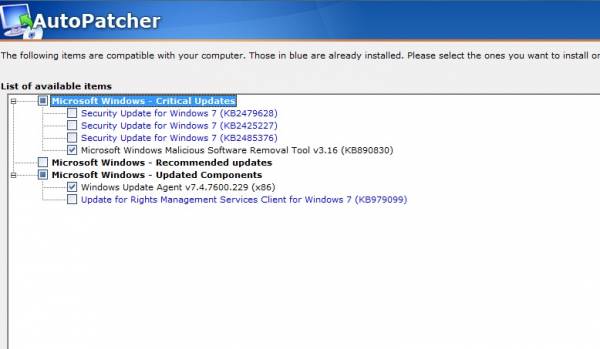
Once the downloads are done you can run autopatcher.exe on any PC,it checks what updates are compatible with the OS running,you mark what to install and click next
screen2.jpg
 
Top
Sign up to the MyBroadband newsletter
X