Router Battery Backup

I ordered mine from evetech last week, got it yesterday. It's not the newer battery as far as I know (as advertised) but it certainly doesn't have a bulge, I'd return that fast. It has a slight curve but you can see it's the design but that is clearly showing something is wrong. Haven't had it long enough to test charge times etc but will post once I know. Sorry to hear of your one.

I will also check next week doubt anything will happen this week long weekend delays :rolleyes:. I ordered one from everyshop since no one has that model in stock (if only the titan had a solar input) next project when warranty is over :)

HiFi Corp, IC, Everyshop are all from JD Group they all get it from the same warehouse in JHB might just be a dud i would take it to a shop or return it before there is no stock. 11 units was available at the warehouse on Monday.
I have that model Gizzu (got it back in Feb, but from Takealot) and it definitely doesn't have that issue, mine seemed well put together. I've never ordered from IC so not sure how easy it would be to exchange it in this situation (and if it still works ok and is just an issue with the case assembly) but it might at least be worth getting in touch with Syntech as they seem quite responsive.

Thanks all.

In the end I opened it up. One of the battery packs was not in its proper place. Turned out to be an easy fix and the cover now fits well.
 
Has anyone used the 12v solar input in the larger Gizzu mini-UPS's?

I'm considering getting a small 20w solar panel from Takealot, this seems like a good option https://www.takealot.com/20w-solar-...-with-usb-multi-head-cable-gd-12/PLID92651409

If both AC power and the DC 12v solar are delivering power, does it charge from the grid or does it prioritise solar when it is available?

Is the purpose of solar to extend running time of the battery during the day?

Under which circumstances does it make sense to hook up this mini-UPS to a small solar panel?
 
Has anyone used the 12v solar input in the larger Gizzu mini-UPS's?

I'm considering getting a small 20w solar panel from Takealot, this seems like a good option https://www.takealot.com/20w-solar-...-with-usb-multi-head-cable-gd-12/PLID92651409

If both AC power and the DC 12v solar are delivering power, does it charge from the grid or does it prioritise solar when it is available?

Is the purpose of solar to extend running time of the battery during the day?

Under which circumstances does it make sense to hook up this mini-UPS to a small solar panel?
TBH unless you are expecting a very long outage , it does not make sense.
 
Has anyone used the 12v solar input in the larger Gizzu mini-UPS's?

I'm considering getting a small 20w solar panel from Takealot, this seems like a good option https://www.takealot.com/20w-solar-...-with-usb-multi-head-cable-gd-12/PLID92651409

If both AC power and the DC 12v solar are delivering power, does it charge from the grid or does it prioritise solar when it is available?

Is the purpose of solar to extend running time of the battery during the day?

Under which circumstances does it make sense to hook up this mini-UPS to a small solar panel?
I haven't, but I also have one of those 20W panels and the next time we have a long unplanned outage I was going to test it. Personally I see it as an emergency charging or travel situation rather than something permanent (and I have no plans to have a little solar panel always connected), given many larger/more expensive power stations seem to have issues with the whole AC/solar/load sharing scenario and I can't be certain it would actually use the solar if it was plugged in to AC, and if so if it was just using that to constantly charge the battery.

It's a nice backup option to have but it would help if there was more info about it, all I've seen is that it's max 20W and the input is max 2a/12v. Would be interested to hear any further info if you find any...
 
I have the Ratel 860p (gizzu and ratel different brands but use the same ECO PCB) with a 50 watt panel (Max as stated in the manual/datasheet) both AC and Solar is plugged in all the time.

I would think the main ac source will be primary till it fails and then the solar will take over just my 2 cents. Everything is combined on the main board so only the manufacturer would know what source is prioritised.

It works perfectly especially in day when there is extra long power outages or your load is a bit on the high side and the ups might drain quicker.
 
I ordered the Gizzu 60W 69Wh mini-UPS From Incredible connection last week and received it today.

It is this version:
View attachment 1514469
I chose this over the Titan because it does POE. Note: this is the newer 69Wh version that comes with LiFePO4 batteries.

When taking it out of the box, it was immediately apparent that the plastic top section is bulging, as if it is being pressured from inside.

View from the back:

View attachment 1514473

View from the side:

View attachment 1514475


If anyone with this specific version of the Gizzu 60W 69Wh mini-UPS can check theirs for similar issues and let me know, that would be helpful. I need to decide what to do.

I have received the one i ordered and it looks like it was a friday lol this unit is also not properly assembled.

Edit:
Fixed it battery was not in the slots that is provided inside the casing.


Last edited:
So I have an issue with my Rain router and POE.

I have:
Rain Outdoor CPE -> POE Injector -> Mikrotik -> AP
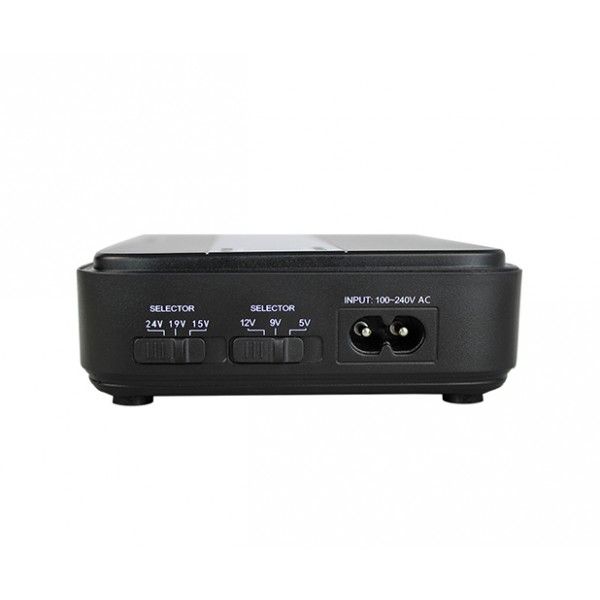
Mini DC UPS powers POE Injector (15v) and AP
The Mikrotik does not get power directly from the UPS, it seems the POE Injector is powering the Rain and Mikrotik? Which is weird.
When I plug the POE Injector (LAN Side) into the AP, there is a red light that comes on on the DC UPS and the AP is not picked up.
Anyone?
 
How do you get 15V?
Not unheard of to see 15V on POE, no?

s-zoom.file
 
I tired to decode your post without success. Could you draw us a picture and include photos?


I hope this makes sense:

1683034390617.png

Rain router is the normal outdoor unit.
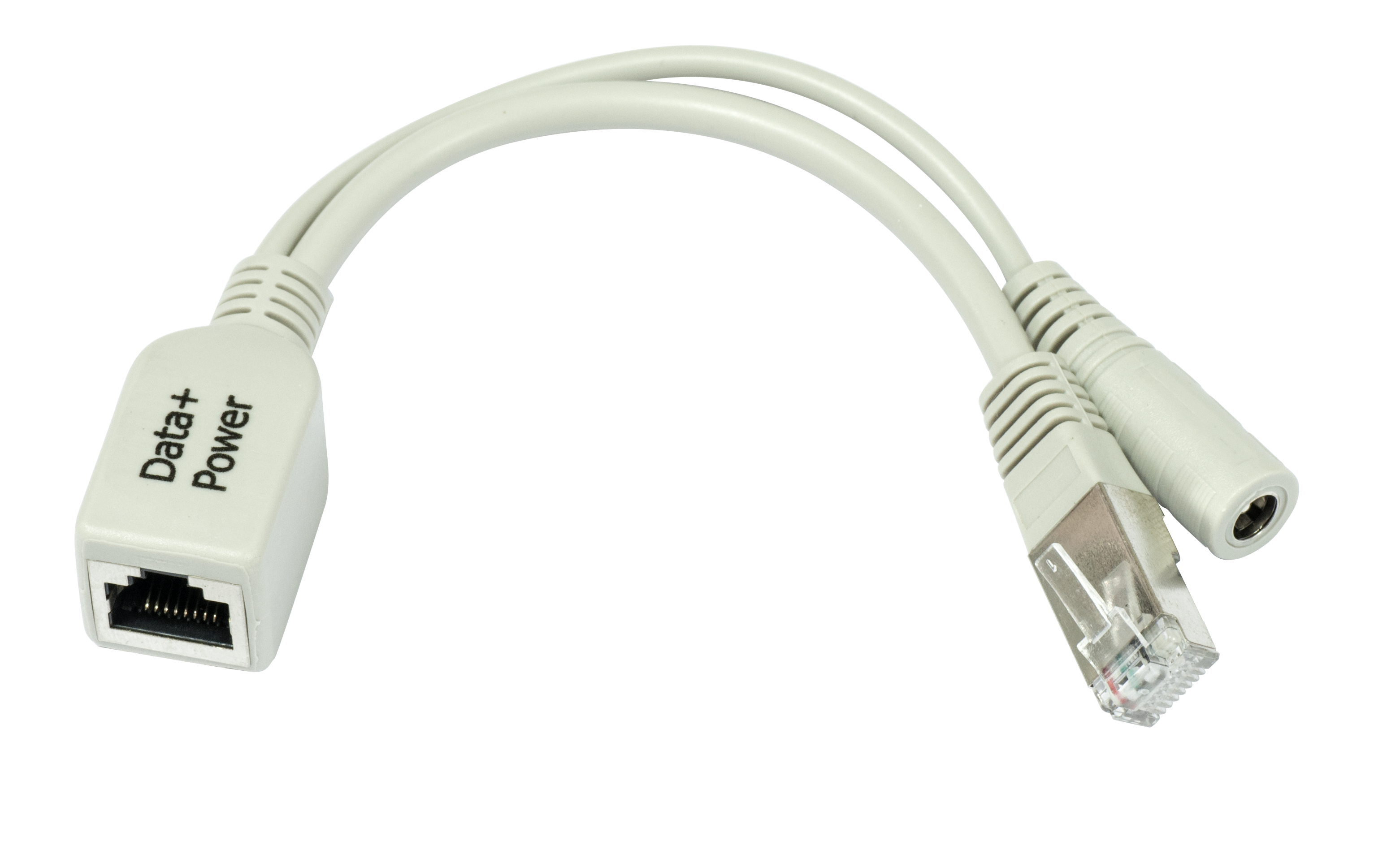
POE Injector looks like this:
1683034467766.png

The mini DC UPS is from Andowl:
ezgif.com-gif-maker_-_2022-09-26t172624.081.jpg

The model number is different though. I do not have built in POE.


How do you get 15V?
I get that directly from the Mini DC UPS.
 
So we are trying to power a 19V router with a 15V feed? How long is that distance? Could you measure the voltage provided to the Rain router, at the router? Voltage drop is a thing and you might not even be feeding the router 15V
 
I hope this makes sense:

View attachment 1517365

Rain router is the normal outdoor unit.
POE Injector looks like this:
View attachment 1517369

The mini DC UPS is from Andowl:
ezgif.com-gif-maker_-_2022-09-26t172624.081.jpg

The model number is different though. I do not have built in POE.


I get that directly from the Mini DC UPS.
So you're feeding 15V to the Rain 19V input? Maybe you need something like this?
1683035474974.png
 
When I plug the Data LAN cable into my Mikrotik, I can power the Mikrotik. So my issue is, I have power on the LAN side of the Mikrotik POE Injector.


So we are trying to power a 19V router with a 15V feed? How long is that distance? Could you measure the voltage provided to the Rain router, at the router? Voltage drop is a thing and you might not even be feeding the router 15V
Yip, it does work though. The router switches on and has been running like that for a while.
Router is on the roof, I would guess about 15meters of cable.

So you're feeding 15V to the Rain 19V input? Maybe you need something like this?
View attachment 1517415
Thank you for the suggestion but I would prefer if I could sort this out without spending more money.
 
So we are trying to power a 19V router with a 15V feed? How long is that distance? Could you measure the voltage provided to the Rain router, at the router? Voltage drop is a thing and you might not even be feeding the router 15V
Sorry, I cannot measure the power at the router. I do not have a way of doing that.
 
When I plug the Data LAN cable into my Mikrotik, I can power the Mikrotik. So my issue is, I have power on the LAN side of the Mikrotik POE Injector.


Yip, it does work though. The router switches on and has been running like that for a while.
Router is on the roof, I would guess about 15meters of cable.


Thank you for the suggestion but I would prefer if I could sort this out without spending more money.
What is the issue again?
 
What is the issue again?
When I plug the data lan side of the POE infector into a router, it does not work. The rain router is not picked up. Tried different routers, the only router that works is the Mikrotik. So basically I have power on both sides of the POE injector.
 
When I plug the data lan side of the POE infector into a router, it does not work. The rain router is not picked up. Tried different routers, the only router that works is the Mikrotik. So basically I have power on both sides of the POE injector.
So it works when you plug the POE data into the pc from the Rain router? Can you try disable DHCP server on DLink so your pc IP address is assigned from Rain router and not the Dlink?
 
So it works when you plug the POE data into the pc from the Rain router? Can you try disable DHCP server on DLink so your pc IP address is assigned from Rain router and not the Dlink?
POE Power is always connected to Rain router.

When I plug the LAN/DATA side of the POE Injector in a router that does not accept POE, the link stays down.
I do not get a IP, even if I use DHCP, link light does not come on, router shows the port is down.

If I plug a POE enabled router in on the LAN/DATA side of the POE Injector, the router starts up, so it is getting power from the LAN/DATA side of the POE Injector.

This is the only Gigabit POE Injector I have, perhaps I must just test with another POE Injector.
 
... I still dont get what the issue is. Lets get back to basics.

1. Do you only have the one POE combiner/splitter? As in, you only have 1 x
848_hi_res.png
and dont have another one on ther Rain router side that splits the single cabel into two? You only have a single LAN cable going into the Rain cpe router?

2. When you say the LAN/DATA side what do you mean? Because the DATA ONLY side is NOT powered in any POE combiner/splitter that I have ever seen. In the image below, the blue cable is the DATA ONLY side of the POE injector, with the red cable being the POWER input. The green cable is the combined DATA+POWER [POE] powered side:
1683061438254.png

Here is the schematic of the average POE combiner and splitter pair. Would I be correct that your setup is similar to the one above? So we can ignore the second half of the breakdown below.
As you can see NO router will be able to be powered from the 'modem/switch' cable below, as it is not connected to any power. Only the DATA+PWOER/POE side of the injector can power items.

F6G83E7HFPTMZPJ.png


3. So what is the issue? If the Rain router powers on using the one GREEN Lan cable only, the blue LAN cable should go do your dlink and everything should work.

If it does not, the RAIN router is being underpowered.

What happens if you simply plug in the blue LAN cable into your laptop?
 
Last edited:
Top
Sign up to the MyBroadband newsletter
X